EDITOR’S CHOICE
Graphics & Design
Turn your screen into a canvas.
A beautiful screen-annotation app for educators, content creators and presenters. Draw on anything, anywhere, instantly.

A beautiful screen-annotation app for educators, content creators and presenters. Draw on anything, anywhere, instantly.
No more “Desktop 1, 2, 3…”. Give every macOS Space a real name and a color, then jump straight to it with a keystroke.

Home127 discovers the web servers running on your machine and drops them right into your menu bar for instant access.

 Turn your screen into a canvas.
A beautiful screen-annotation app for educators, content creators and presenters. Draw on anything, anywhere, instantly.
Turn your screen into a canvas.
A beautiful screen-annotation app for educators, content creators and presenters. Draw on anything, anywhere, instantly.
Scribbble lets you draw directly on top of your screen — over any app, any window, any moment. Perfect for teaching, demos, presentations and recordings where pointing isn’t enough. Grab a pen, circle the thing that matters, sketch an arrow, highlight a flow — then clear it all with a keystroke. Smooth, pressure-aware strokes and a thoughtfully minimal toolbar keep the focus on what you’re explaining, not on the tool.
• Redesigned floating toolbar • New highlighter & shape tools • Performance improvements for 4K displays
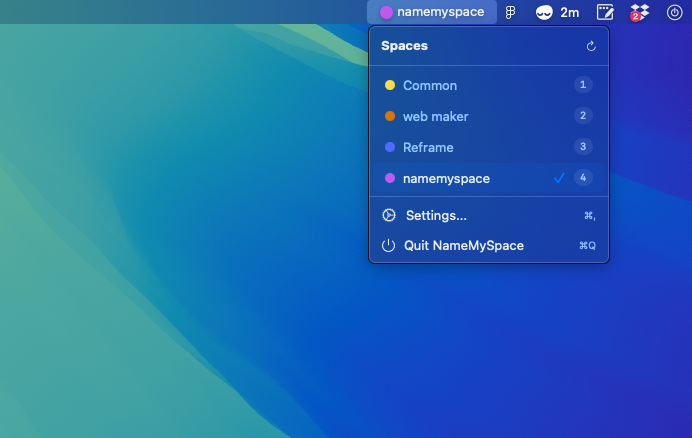
NameMySpace lives quietly in your menu bar and finally fixes the one thing macOS never did — it lets you give your desktops real names and colors instead of forgettable numbers. Set up a Space for Design, one for Email, one for Deep Work, and switch between them instantly with a keyboard shortcut. Color-coding makes the active Space obvious at a glance, so you always know exactly where you are. Lightweight, native, and built to disappear into your workflow.
• Smoother Space-switching animations • New color palette presets • Fixes for multi-display setups
Where do your hours go?
A precision time tracker that lives in your menu bar. Start a timer, track projects, and see exactly where your hours go — all without leaving your workflow.
TimeSpan is a beautifully native macOS time tracker that lives in your menu bar. Start a timer with one click, tag it to a project, and get back to work — no context switching, no clutter. When you want the picture, animated donut charts break down your month at a glance so you can see exactly where your hours went across every project. An optional frosted-glass floating timer keeps the running clock visible wherever you are, and smart fuzzy search resurfaces recent projects so you can resume in a single click. Lightweight, private, and entirely local — your data never leaves your Mac.
• Initial release • Menu bar timer with project tracking • Monthly analytics with donut charts • Floating timer & smart search
Every localhost, one click away.
Home127 discovers the web servers running on your machine and drops them right into your menu bar for instant access.
If you’re a developer, you’ve got servers running on ports you can never remember. Home127 finds every local web server running on your Mac and lists them in your menu bar, ready to open in a click. No more typing localhost:3000, :8080, :5173 from memory. Home127 keeps a live, always-current list of what’s actually running — so you spend less time hunting for ports and more time building.
• Initial public release • Live server discovery • Menu bar quick-open